
- Structure
- Structure helps Atlassian's largest customers track, manage, and visualize progress across Jira projects
- Overview
- Atlassian Marketplace
- Download Archive
- Cloud Pricing
- Server Pricing
- Data Center Pricing

- Gantt
- Add the power of Gantt charts to Jira projects
- Overview
- Atlassian Marketplace
- Download Archive
- Cloud Pricing
- Server Pricing
- Data Center Pricing

- Deliver
- Build project forecasts to guide team success
- Overview
- Atlassian Marketplace
- Server Pricing
- Data Center Pricing

- Pages
- The Ultimate Jira-Confluence Collaboration Tool
- Overview
- Atlassian Marketplace
- Download Archive
- Server Pricing
- Data Center Pricing

- Testy
- Test checklists extension for Structure
- Overview
- Atlassian Marketplace
- Download Archive

- Client for Jira is now an open source product!
Interactive desktop client for Jira. Available via open source or as a free product.

- Structure Version: 8.3 April 26, 2023
- Free 30-Day Trial
- Download Archive

- Structure.Gantt Version: 3.5 Nov 21, 2022
- Free 30-Day Trial
- Download Archive

- Structure.Deliver Version: 1.0 March 12, 2021
- Free 30-Day Trial

- Structure.Pages Version: 1.7.1 Sep 07, 2022
- Free 30-Day Trial
- Download Archive

- Structure.Testy Version: 2.7.0 Jan 26, 2022
- Free 30-Day Trial
- Download Archive
- Version: 2.1.1 Sep 25, 2017
- Free 30-Day Trial
- Download Archive

- Version: 3.8.4 Aug 21, 2017
- Free Version
- Download Archive
-
- Structure
- Choose your platform:
- Cloud Pricing
- Server Pricing
- Data Center Pricing
-
- Structure.Gantt
- Choose your platform:
- Cloud Pricing
- Server Pricing
- Data Center Pricing
-
- Structure.Deliver
- Choose your platform:
- Server Pricing
- Data Center Pricing (Coming Soon)
-
- Structure.Pages
- Choose your platform:
- Server Pricing
- Data Center Pricing
-

- Colors for Jira
- Choose your platform:
- Server Pricing
Deskzilla 2.1 Beta 1 Released
We are announcing the first beta version of Deskzilla 2.1 along with its free counterpart, Deskzilla 2.1 Lite. For this release, we mainly focused on two things: the long-awaited support for Bugzilla flags and the improvement of user experience to make bug tracking even more simple and powerful.
When we were planning this release, at first we wanted to get down to making Deskzilla more enjoyable and easy to use without adding new features at all. As we could not also ignore the long-standing request for flags, we finally let some features in — still keeping them as simple as possible. Let's look at what Deskzilla enables you to do with flags.
Support for Bugzilla Flags
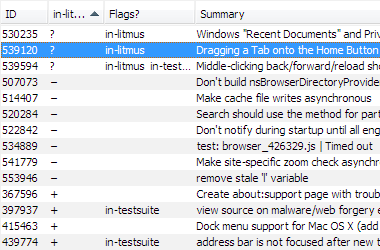
You can see flags that are set on a bug in the bug table — just add a column for the flag you are interested in. There are also columns that show all flags with specific status (like '?') or just all flags.
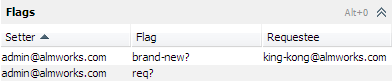
Full information about all flags set on a bug is displayed in the detailed bug view.
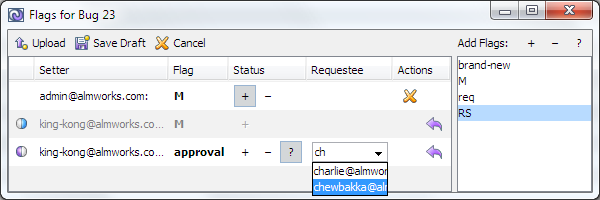
You can open flag editor while creating or editing a bug, or directly from the detailed bug view.
Searching for flagged bugs is possible by flag setter, requestee, or type. You can search with a more specific filter like "bugs on which I was asked about approval" with a dedicated query type.

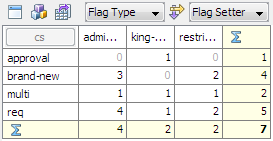
Similar to other multi-valued fields, you can build a Distribution or Tabular Distribution by Flag Requestee, Flag Setter or Flag Type.
Just like with any other Bugzilla field, you can now export flags to PDF, HTML, XML, or CSV.
As of this version, attachment flags are not supported. If you miss this feature, feel free to sign up and vote for the corresponding issue in our tracker. Bug flags are supported for all Bugzilla versions starting from Bugzilla 2.22.
Usability Improvements
Deskzilla 2.1 contains a lot of user experience improvements. We'll name just a few of them.
Revamped interface
We have redesigned the main menu to make it more logical. Also, on Windows and Linux, all fonts in the application now look better.
Attach files and screenshots when creating bugs
Capture a screenshot, edit and attach it directly from the New Bug window. To add a screenshot to an existing bug, you can paste or drag-and-drop an image on it, and screenshot editor will appear. Note that you can now Undo and Redo your changes in the screenshot editor. Similarly, it is possible to attach a file when creating a bug.
New connection wizard
We have introduced a new way to create and edit connection settings — the Connection Wizard, and removed the old Connection Manager dialog. Now, to create a connection you need to use Connection | New Bugzilla Connection menu item, and to change connection settings you can right click on a connection node in the Navigation Area and choose Edit Connection Settings.
Clickable links to comments, attachments and emails
Navigate to comments, open attachments, and create emails with a single click on Bugzilla-style references in description, comments, and large text fields.
Quick as-you-type navigation
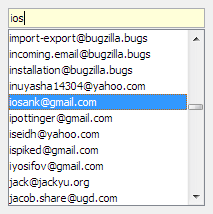
We have added quick navigation to all lists — start typing, and the first matching item will be selected. Area above the list shows what you've typed. You can use arrow keys to navigate to the previous and next matches.
Recent items
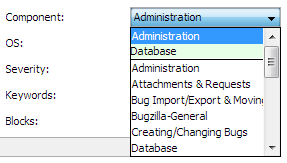
When you need to choose a field value, Deskzilla will suggest recently selected options at the top of the list.
Improved New and Edit Bug windows
New and Edit Bug windows now also check for illegal values and warn if you try to upload or save them.
Message panel
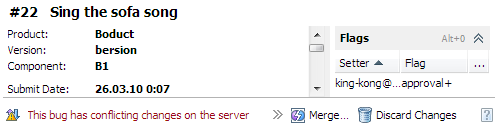
If Deskzilla needs to tell you something about a bug, it displays a message in the new panel found below the bug viewer. If something goes wrong, don't panic! Deskzilla will offer appropriate actions to deal with the problem.
Bug fixes
This release is notable for a bunch of bug fixes and optimizations. We have addressed 180 issues, including:
- DZO-762 Bug duplicates on each download details
- DZO-23 Deskzilla allows the user to enter in unrecognized keywords
- PLO-576 Highlighting of text search matches in comments is broken
- DZO-658 Changes to See Also field are not uploaded
- DZO-633 Allow to enter values in Resolution field only when the status is set to a closed one
- DZO-467 Options for product-dependent fields (e.g. Milestone) are not narrowed to valid options on workflow action window
- PLO-431 Time tracking window shows wrong bug
- PLO-50 "Open Containing Folder" doesn't work on Vista
Switch to Java 6
Starting from this release, Deskzilla leverages benefits of Java 6. Windows distribution includes bundled Java 6. On Macs, Java 6 is supported on:
- Snow Leopard (Mac OS X 10.6), and
- 64-bit Leopard (Mac OS X 10.5.2 and above) with Java for Mac OS X 10.5 Update 1 and above.
Upgrading to Deskzilla 2.1 Beta 1
To upgrade from a previous version:
- Backup your workspace.
- Install the new version over the old one and start Deskzilla.
- Reload Bugzilla configuration using Connection | Reload Bugzilla Configuration.
- If you're using Bugzilla flags, Deskzilla needs to reload bugs from Bugzilla in order to get information about their flags. Use Right-Click | Reload Query from Server on the most generic query that you're using (like "All Open Bugs").
This version may be used in a free 30-day trial mode or with any Deskzilla license key with active maintenance subscription.
Deskzilla 2.1 Beta 1 will stop working on June 23, 2010. Please upgrade to the latest release version before that time.
As always, we'd like to know your opinion. If you are experiencing a problem or need a feature, please raise an issue in our issue tracker.
Igor Baltiyskiy
ALM Works Team
Links: