- Structure
- Structure helps Atlassian's largest customers track, manage, and visualize progress across Jira projects
- Overview
- Atlassian Marketplace
- Download Archive
- Cloud Pricing
- Server Pricing
- Data Center Pricing

- Gantt
- Add the power of Gantt charts to Jira projects
- Overview
- Atlassian Marketplace
- Download Archive
- Cloud Pricing
- Server Pricing
- Data Center Pricing

- Deliver
- Build project forecasts to guide team success
- Overview
- Atlassian Marketplace
- Server Pricing
- Data Center Pricing

- Pages
- The Ultimate Jira-Confluence Collaboration Tool
- Overview
- Atlassian Marketplace
- Download Archive
- Server Pricing
- Data Center Pricing

- Testy
- Test checklists extension for Structure
- Overview
- Atlassian Marketplace
- Download Archive

- Client for Jira is now an open source product!
Interactive desktop client for Jira. Available via open source or as a free product.

- Structure Version: 8.3 April 26, 2023
- Free 30-Day Trial
- Download Archive

- Structure.Gantt Version: 3.5 Nov 21, 2022
- Free 30-Day Trial
- Download Archive

- Structure.Deliver Version: 1.0 March 12, 2021
- Free 30-Day Trial

- Structure.Pages Version: 1.7.1 Sep 07, 2022
- Free 30-Day Trial
- Download Archive

- Structure.Testy Version: 2.7.0 Jan 26, 2022
- Free 30-Day Trial
- Download Archive
- Version: 2.1.1 Sep 25, 2017
- Free 30-Day Trial
- Download Archive

- Version: 3.8.4 Aug 21, 2017
- Free Version
- Download Archive
-
- Structure
- Choose your platform:
- Cloud Pricing
- Server Pricing
- Data Center Pricing
-
- Structure.Gantt
- Choose your platform:
- Cloud Pricing
- Server Pricing
- Data Center Pricing
-
- Structure.Deliver
- Choose your platform:
- Server Pricing
- Data Center Pricing (Coming Soon)
-
- Structure.Pages
- Choose your platform:
- Server Pricing
- Data Center Pricing
-

- Colors for Jira
- Choose your platform:
- Server Pricing

Client for Jira (formerly known as Jira Client) is now an open-source product!
As of May 2020, new feature development for this product has ceased and support for it is limited. The details are available in the Jira Client Reference.
Consequently, we've recently made the product available in open-source form. And, for those who want to continue using the product as is, there is a free, unsupported version available via the button below.
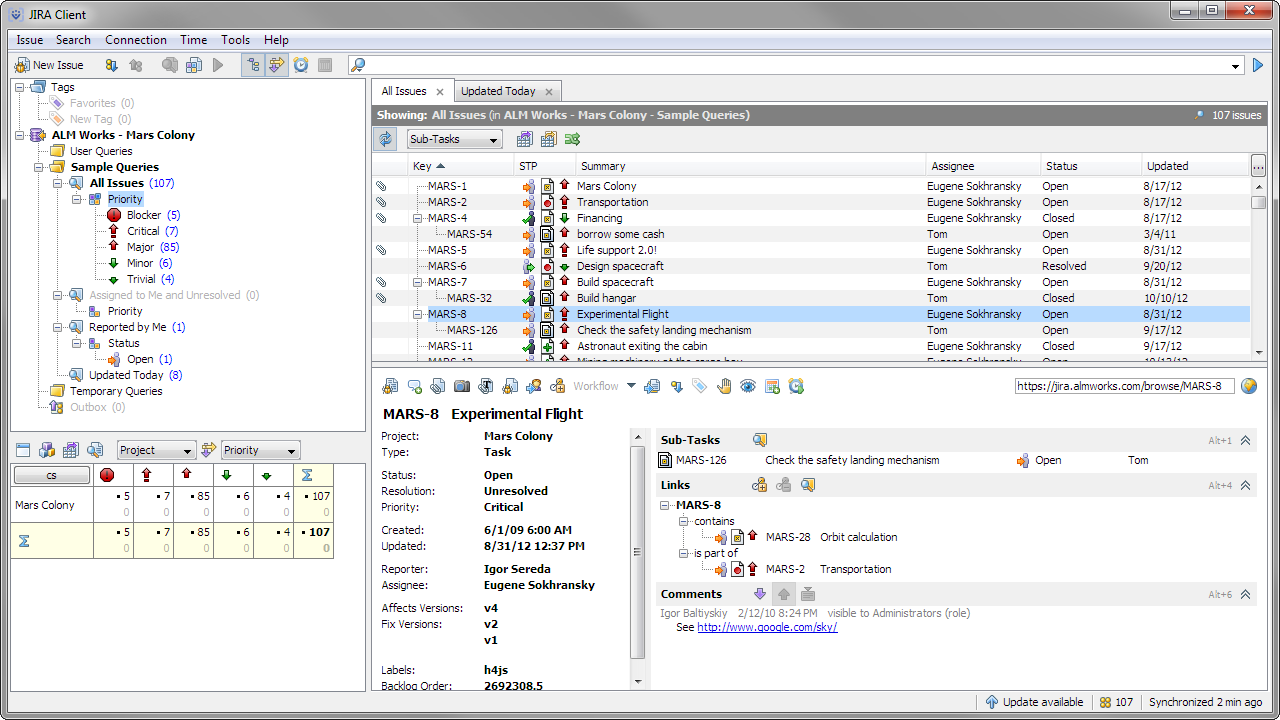
Desktop Power for Jira
Jira Client is a desktop application for day-to-day work with Jira issues. It helps you quickly navigate and drill down into issues, schedule tasks and triage problems with drag-and-drop, accurately track time, work when you are offline.
Overall, Jira Client is a great help and time-saver for Project Managers, Consultants, QA, Help Desk — people who work with Jira extensively throughout the day.
| Supports Jira: | 6.3—7.10.x or later |
|---|---|
| Operating Systems: | Windows, Mac OS X, Linux |